

Communication options are seemingly endless for modern offices: texts, emails, instant messaging, and video conferencing, to name a few. All these technologies have their purposes and benefits, but they can’t take the place of another essential communications tool: an office intercom system.
Intercoms are an integral part of the ideal flexible workplace tech stack for today’s typical office. They create a secure entry for employees and visitors, enable communication at unstaffed entrances, and support hybrid workplace operations. On top of that, they provide flexibility, convenience, and scalability.
In this article, you’ll learn what office intercom systems are, how they operate, and why they’re so essential for offices across all industries. We’ve also put together a quick list of criteria to use when deciding what intercom system is the best fit, ensuring you can match a solution to your specific office type.

What is an office intercom system? #
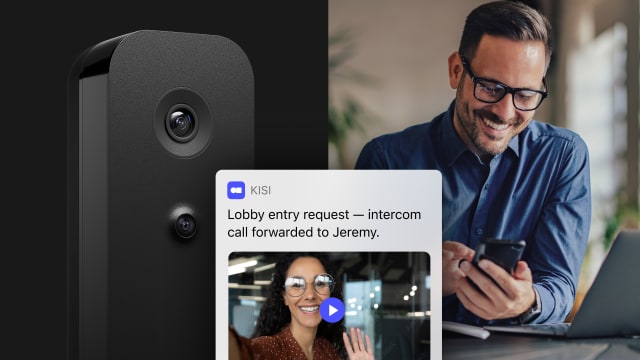
An office intercom system is an electronic network designed for two-way communication using audio and, in some cases, video technology. It allows office teams, departments, and visitors to speak through a digital tool without interacting face-to-face. Most systems include functionalities such as visitor screening and remote door unlocks.
In the past, business video intercom systems typically required an on-site staff member who worked at a desk and answered requests from a device placed at an entry point. Today, cloud-based and mobile-enabled solutions have transformed this experience. Rather than keeping an employee on standby in a reception or security monitoring area, offices can route their intercom communications to smartphones and other devices located both on and off-site.
These capabilities are especially critical for hybrid workplaces or unstaffed environments, where managing access remotely is critical to office efficiency and security. Solutions like Kisi combine access control with intercom functionality and integrate with other security systems, such as supported video surveillance tools.
Types of intercom systems for offices #
Before you can select an office intercom system, you first need to understand how they differ in design. These are the kinds available:
- Wired: Wired intercoms require physical cabling and hardware, which you connect to an intercom panel installed at one or more office entry points.
- Wireless: A wireless intercom system uses Wi-Fi to transmit a signal from a doorbell or microphone to other devices.
- Audio-only: Audio intercom systems allow office employees to speak to individuals attempting to enter the premises.
- Video and audio: Some systems include cameras, so staff can not only hear but also see the person at the door.
These distinctions will help you determine whether an office intercom is appropriate for your office needs.

Ready to handle visitors without being tied to a front desk?
Manage guest arrivals, deliveries, and contractors directly from your phone.
Challenges of operating an office without an intercom system #
Office intercoms are vital to daily office activities and closing communication gaps. They address several common problems businesses experience, particularly those with hybrid work models.
Delivery management #
Companies without intercoms often experience communication barriers and inefficiencies during the delivery process. Delivery personnel can’t communicate directly with office staff or verify someone is present in the office to receive the package.
As a result, they’re more likely to leave missed delivery notices, requiring your team to rearrange the delivery or travel to the post office to collect the item. Drivers might also leave packages in unsecured areas, putting them at risk of theft or damage. These issues contribute to higher failed delivery rates, wasted time, and delays in receiving important supplies.
Unstaffed reception areas #
When a visitor is greeted by an empty reception desk, they might question whether the office is open or assume your company is unprofessional. Without an intercom, they can’t notify staff of their arrival or ask for assistance, leaving them to use less reliable methods, such as calling an office number with a phone. Those calls might go unanswered, worsening the guests’ already negative impression of your organization.
These circumstances can cause frustration and uncertainty in visitors. In response, they might wander the premises to try to find a staff member on their own. This increases security risks for your office because unscreened individuals are unmonitored for longer periods of time. In addition, the lack of an intercom means visitors can’t report suspicious activity outside the building and staff can’t screen visitors before giving them access.
Offices without intercom systems make it difficult or impossible for staff to grant entrance to visitors unless they’re physically present at the door. In hybrid offices, where employee schedules fluctuate from day to day, this could leave guests waiting for extended periods or struggling to connect with the employees they need to see.
The inability to remotely screen and authorize visitors also drives up costs. Businesses must keep reception desks staffed continuously during operating hours and, in some cases, after hours. Alternatively, offices can restrict the times when they accept visitors, potentially creating friction with prospective clients, customers, and other stakeholders.

Crucial features of an office intercom system #
The right intercom system allows your company to streamline its operations while improving the employee experience and strengthening security. A high-quality solution will help you achieve those goals with a set of core capabilities.
Mobile unlocks #
With intercom systems like Kisi’s, staff can verify and grant access remotely via a smartphone or other internet-enabled device. Whether someone needs to enter during regular hours or speak to a staff member after everyone has gone home, you can respond to intercom requests and unlock doors for visitors, couriers, or service providers. An intercom system frees you from keeping a receptionist or security staff member waiting at a desk to open the door when someone arrives, minimizing costs and giving you greater control over your office access.
Visitor verification #
Without the right tools in place, your office employees have no way of knowing with any certainty who is at the door without physically going to see them. An intercom solves this problem by allowing staff to visually or audibly confirm a visitor’s identity without approaching the door. They can see, hear, and speak with visitors at the door and decide if they should be granted building access.
This process, while critical, is also simple. The visitor initiates contact by pressing a button on the intercom panel, and staff receive a notification on their phone or other device. They can then communicate with the guest to verify who they are and inquire why they want to enter the office. This stops unauthorized entries, prevents tailgating, creates an access log, protects staff and assets, and supports compliance efforts if you work in a highly regulated industry.
While the intercom handles unannounced visitors who arrive without prior notice, solutions like Kisi also support scheduled guest access through visitor management features. Teams can send time-limited access links or QR codes to pre-registered visitors, allowing them to enter without downloading an app or waiting at the door.

Give everyone a smoother entry experience
Learn how Kiosk Pro makes check-ins, access, and bookings easier to manage.
Remote management #
When you use an intercom system, you can handle access, grant visitor entries, and manage staff permissions from anywhere. This eliminates the need for staff to be physically present on site, making operations more efficient. It also enhances convenience for visitors, who may not have a host’s contact information and may thus be unable to reach out to them upon arriving unless they can use an intercom.
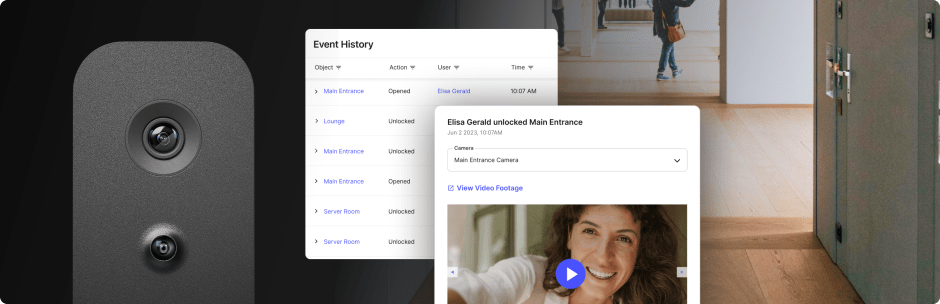
Kisi’s Video Intercom Pro logs all intercom activity directly in the Kisi dashboard, giving teams a clear audit trail of who rang the door and when. For additional visual context beyond intercom events, Kisi also integrates with supported video surveillance systems. This is particularly important for hybrid teams who may not always be on site to make important changes or updates.

How to choose an intercom system for your office #
Finding an office intercom system that meets all your needs and preferences can be challenging, but knowing what to look for can help narrow your search. Follow these steps to simplify the process:
- Assess your goals: Decide whether you want an intercom system for visitor management, internal communications, deliveries, or all of the above. Pinpointing what you want to achieve will allow you to focus your attention on solutions designed for those purposes.
- Evaluate your office design: Look at your office layout and existing infrastructure to determine whether you want a wired or wireless system. While wireless systems offer easier installation for homes, professional offices should prioritize PoE (Power over Ethernet) systems like Kisi’s to ensure a stable connection that won't drop due to Wi-Fi interference.
- Examine your staffing and visitor traffic: Track your visitor traffic and compare it to your usual staffing. This information will help you determine the complexity and type of intercom system you need.
- Look for essential features: Determine what solutions offer the best range of features, including video and audio quality, integrations with access control and other systems, scalability, and mobile access. For instance, Kisi supports full HD video resolution and includes echo and noise cancellation features for enhanced audio.
- Prioritize security: Eliminate any options without proven security measures in place. Solutions like Kisi have fully encrypted communication to protect sensitive information and stop unauthorized users from accessing your data.
- Consider the ROI: Look at the upfront and long-term costs of the system compared to the financial gains it will help you achieve. Estimate how you can lower your expenses with faster communication, fewer miscommunications and errors, tighter security, and automation, which lowers labor costs and staffing requirements.
Working through this process will help you make an informed decision based on the specific characteristics of your office. To get the necessary insights, look at user reviews for potential solutions and (most importantly) take advantage of a demo or trial period before committing to a provider.
Enable convenient communication with an office intercom system #
An office intercom system is key to creating an efficient, productive work environment that’s convenient for employees and visitors alike. Speeding up communication between employees and with outside parties, including delivery personnel, third-party contractors, and clients, helps optimize your operations and promotes stronger connections.
Kisi’s future-proof solutions are ideal for any office aiming for better visitor and delivery management. Reach out to get a demo and see how Kisi’s intercom system supports your office security, scalability, and access control.

Vera Eftimovska
Marketing Campaign Manager at Kisi, blends her psychology background with hands-on experience in access control and workplace security. Passionate about how technology and human behavior intersect, she shares insights that help businesses build resilient, future-ready, and security-driven workplaces.