


Managing access for a single gym is something you can somewhat solve with staff and a bit of attention, but once you're running several locations, though, the problem changes shape. That’s due to the fact that members expect more than one team or a fragmented system can deliver.
The answer to that problem is access control and the features a multi-location gym can benefit from. Below, we broke down eight core access control features for multi-location gyms, what they do and how they can help automate and improve your facility.

What access control features do multi-location gyms need? #
1. Centralized cloud dashboard #
The old way of doing access control involved a local server at each site, which quickly became an issue because you would need a separate login for every gym, a separate database, and sometimes even a separate VPN connection just to check who came in at a specific time.
If you multiply that by five or seven locations, then probably a decent chunk of time is lost to system administration. Using a cloud-based system removes all the extra loops, because all of that is collapsed into one dashboard. The admin can unlock a door in one city, adjust the schedule in another, or onboard a new location remotely.
2. Real-time membership software integration #
Your access control should and can take orders from your billing system. When the two are integrated, a new signup gets door access the moment payment clears, and a failed payment or cancellation revokes it just as fast.
Access control platforms like Kisi integrate directly with gym management software such as Mindbody, ABC Glofox, Gymdesk, and Gymflow, so membership status and door permissions stay in sync automatically. If you’re running multi-location memberships, this is the feature that makes “roaming” feasible, because the membership record defines which locations a member can enter, and the doors enforce it.
3. Mobile credentials with device verification #
Key fobs and plastic cards get lost, cloned, and handed to friends. Mobile credentials fix most of that because the phone is the credential, and people usually guard their phones more than anything. The stronger versions of this feature restrict each member to one verified device, so a login shared with a roommate stops working as a second key.
Members also prefer it since they have the “key” in their pocket which opens any of your locations, plus wallet passes and QR options for the edge cases. Every unlock is logged against a named person, which also matters the day you need to know exactly who was in the building.
4. Tailgating detection #
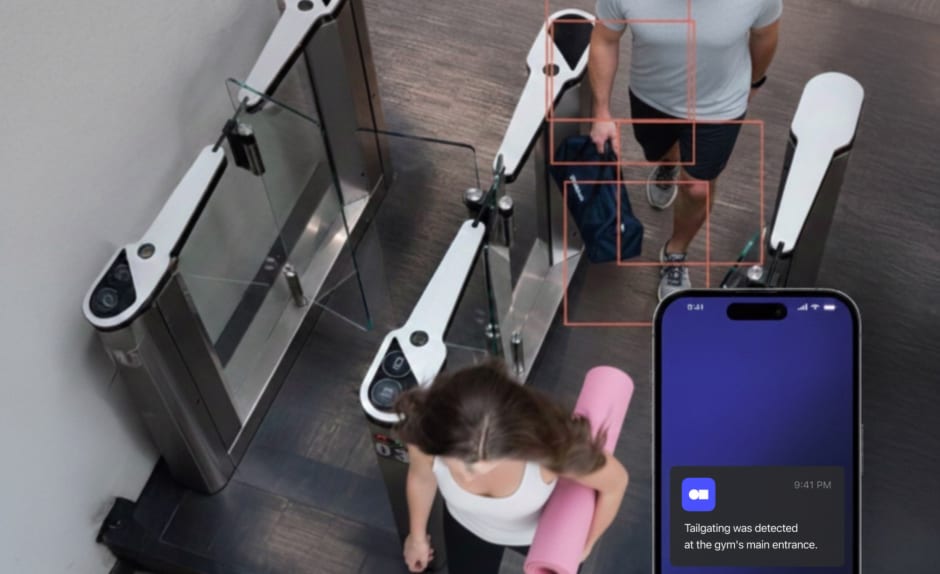
Tailgating (a.k.a. when someone slips in behind a paying member) is unfortunately the entry method no credential can stop on its own. Detection works by comparing video footage against entry logs, meaning two people walk through, one credential was presented, then the system flags it.
Depending on staffing, you can route those alerts in real time to on-site staff or as a daily summary for unmanned locations. For a gym charging $69 a month, even a handful of regular tailgating attacks per location adds up to thousands in annual lost revenue, so this feature tends to pay for itself pretty quickly.
5. Anti-passback #
Anti-passback is another feature worth adding to your stack because it blocks a member who badges in, then passes their credential back through the door for a friend. The system tracks entry and exit state per credential, so if a fob or phone that is already inside tries to enter again, access is denied and the event is logged. Good implementations handle the edge cases too and reset the state automatically when someone forgets to badge out. This way, legitimate members never really get stranded.
6. Permissions by zone and membership tier #
In any facility, the rule is usually that not every member should open every door. Tiered permissions do a great job in letting you map access to what people pay for. For example:
- base members get the gym floor during staffed hours
- premium members get the recovery suite and the sauna
- staff get the office and storage
In a multi-location setup this extends across sites, so a single-club membership works at one address while an all-access plan works everywhere. It is also how you monetize space more efficiently, and have premium zones only sell as upgrades if the door can tell tiers apart.
7. 24/7 operation and offline resilience #
Extended hours are where access control really earns its keep, since the alternative is paying someone to sit at a desk overnight. The features that make unstaffed hours safe are scheduled access rules (which doors open for whom, and when), video integration to verify entries remotely, and offline resilience. As a mention, this last one gets overlooked, because if the internet drops at 2 a.m., doors should keep working, which is why credentials should be cached locally on the door controller rather than checked against the cloud on every unlock.
8. Cross-location reporting and audit trails #
With access control, security isn’t the only important factor. Analytics plays a huge role in how operators take smarter decisions for their business and also keep up with compliance requirements. Having reporting features and audit trails is critical. With every entry logged across every site, you get answers that multi-location operators otherwise guess at:
- which location is over capacity at 6 p.m.
- which one justifies longer hours
- whose attendance pattern suggests they are about to cancel.
Entry events can double as attendance check-ins in your gym software, so the data flows both ways. Audit trails also settle disputes, for example when a member insists they were charged for a gym they never visit, the log says otherwise, or confirms it.

How do you manage access across multiple gym locations? #
Managing all locations comes down to the visual brain of the operation, which is the cloud dashboard. You can have one credential per member that works at every site their plan includes and manage everything from there.
Ultimately, the membership record is the source of truth so what that means is your gym management software defines which locations and zones a member can access, the integration pushes that to the access control system, and each door enforces it locally.
Admins set permissions per location, per zone, and per schedule from a single interface instead of maintaining separate systems per gym. If you add a new location, then you only need to install the door hardware and add it to the dashboard, and existing members with multi-site plans can enter on day one.
How do you make sure only paying members can enter? #
You make sure that only paying members can enter your facility by connecting access control to your billing system so payment status controls the door. Members in good standing unlock with their phone or card, and a lapsed payment, freeze, or cancellation revokes access automatically (this happens usually within seconds of the status change).
After that, you only need to close the workarounds: device verification stops credential sharing, anti-passback stops handoffs at the door, and tailgating detection catches people entering without a credential at all. Together those cover the three ways non-payers get in (borrowed credentials, passed-back credentials, and no credentials).
How the main gym access control providers compare #
For most multi-location fitness facilities, the practical shortlist comes down to cloud platforms with native gym software integrations, since the billing sync is what automates member verification. Hardware-first and component vendors make sense at enterprise scale or in builds with unusual requirements.
There is always more to learn on the best access control systems in the world, but ultimately, the choice comes down to your type of facility and the members you entertain.
Frequently asked questions #
Can members use one membership at multiple gym locations? #
One hundred percent, but only if the access control system supports multi-site credentials. The member carries one credential (usually their phone) and the system checks their plan to decide which locations it opens.
How do gyms stop non-members from getting in? #
There are usually three mechanisms that cover this issue: billing integration that revokes access the moment a membership lapses, device verification and anti-passback to stop credential sharing, and tailgating detection to flag people entering behind a member. Video integration is also encouraged, because it adds visual confirmation during unstaffed hours.
What happens to door access when a member stops paying? #
With billing integration, access is revoked automatically when a payment fails or a membership expires.. If the member settles the balance, access is restored the same way. Some setups also notify the member through the app so they can fix the payment and get back in immediately.
Do gym access control systems work during internet outages? #
Good ones do. Systems that cache credentials locally on the door controller keep unlocking for active members even when the connection drops, then sync logs once it returns. Just ask about offline behavior before buying, because cloud systems vary on this.
Is gym access control worth it for a two-location operation? #
Usually, yes. The economics are the same as for larger chains, just smaller, so extended or 24/7 hours without overnight staffing, recovered revenue from blocked sharing and tailgating, and one admin managing both sites remotely. Most operators report payback within the first year, and a system that scales means location three inherits the setup instead of restarting it.

Ana Coteneanu
Content writer @ Kisi | Ana focuses on long-form content that explores access control, space monetization, security, and modern workplace operations. With a background in technology-driven industries, she specializes in turning complex topics into practical insights for business audiences.
