


It’s no secret that gym members train at odd hours now. Some want in at 5 am, others at midnight, and the overall base of subscribers wants the option to go in whenever they want, even if they rarely use it. That’s why staffed hours can't stretch to meet that demand because payroll grows with every extra hour the doors stay open, and an overnight shift for a handful of regulars rarely pays for itself.
Extending hours is now almost mandatory to scale a gym and one overarching factor that can contribute the most to this change comes down to one substitution: automated systems. Access control decides who gets in, membership software decides who is allowed in, and cameras tied to entry events tell you what happened when nobody was there to watch.
These three things working together can completely automate your facility around the clock and below we’ll break down the full setup.
What unmanned gym operations require #
Unmanned extended gym operations means running a facility for some or all of its hours with no staff on site. Everything is handled by systems instead of people and to make that workable, four basic components are needed:
- Access control at the door: Electronic locks with a cloud-based controller, unlocked by a credential rather than a key. This is the foundation, since a propped-open door or a shared physical key defeats everything else.
- Membership sync: Your access system connects to your gym management software so that an active, paid-up membership is the thing that opens the door. When a payment fails or a membership expires, access shuts off on its own.
- Cameras paired with entry events: Cameras for gyms become useful when each unlock event is matched to video of who walked in, so you can verify that one credential meant one person and there is no tailgating involved.
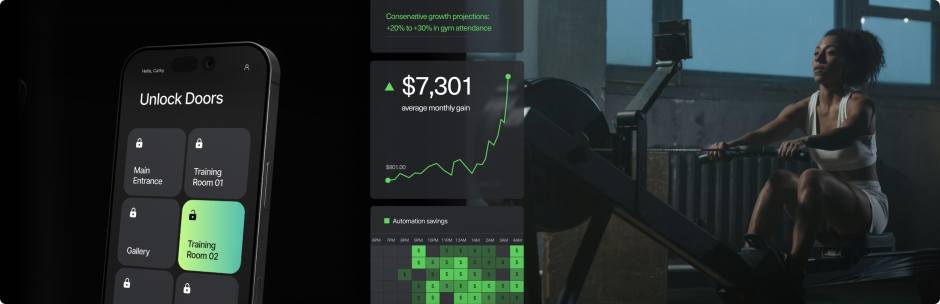
- A remote management layer: A dashboard where you can see entries in real time, unlock a door for someone from your phone, and pull an audit trail after the fact. During unstaffed hours, this dashboard is effectively your front desk.
A lot of people believe that automated gym management is a bigger lift than it is, but most of the work is in connecting systems you probably already have.
How to run a gym 24/7 securely, step by step #
1. Audit your entry points. #
The first step to automate is to map out your space: know each entry point (main entrance, back door, fire exits, staff entrance, loading door. etc). Decide which ones go on access control and which stay locked outside staffed hours. Most gyms end up controlling one or two member-facing doors and hard-locking the rest. P.S.: Fire exits need to open freely from the inside, but we’ll get to that in step 7.
2. Choose your credentials #
Fobs and PIN codes are cheap and familiar, but both fall apart during unstaffed hours for the same reason: they're easy to hand to someone else. A PIN can travel by text message and a fob works for whoever holds it. Mobile credentials are the game changer because they’re tied to a member's phone and much harder to share, since lending your phone for a workout is a bigger ask. For a staffless fitness center, mobile access is the safer default, with fobs as a fallback for members without smartphones.
3. Sync access with membership status #
Connect the access system to your CRM or gym software so entry rights update automatically. This way, new sign-up gets access within minutes, while failed payment loses it just as fast. This step protects revenue more than any camera does (although this is also necessary), because it removes the gap between "membership lapsed" and "someone noticed."
4. Layer video on entry events #
As mentioned above, cameras are necessary, but not just for having footage for the sake of it. Having a camera at each controlled door and integrating it with the access system, means every unlock has a face attached. During staffed hours this is a nice-to-have, but during unstaffed hours it's crucial because not only do you know who was in the building, you can also detect tailgating events easier and get an alert if something goes wrong.
5. Add tailgating detection #
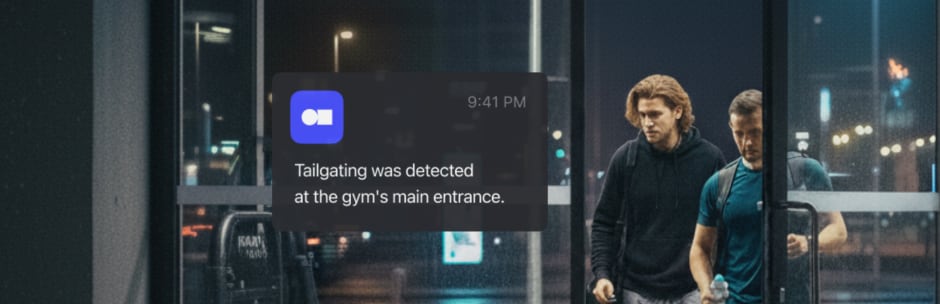
Speaking of tailgating, that’s where someone follows a paying member through the door without their own credential, and it also happens to be the main leak in any extended-hours setup. A front desk catches follow-ins during the day, but at 11 pm, when nobody is watching, it’s a risk. Modern systems compare the number of people crossing the threshold against the number of valid unlocks and flag the difference, with footage attached.
6. Set up remote support for edge cases #
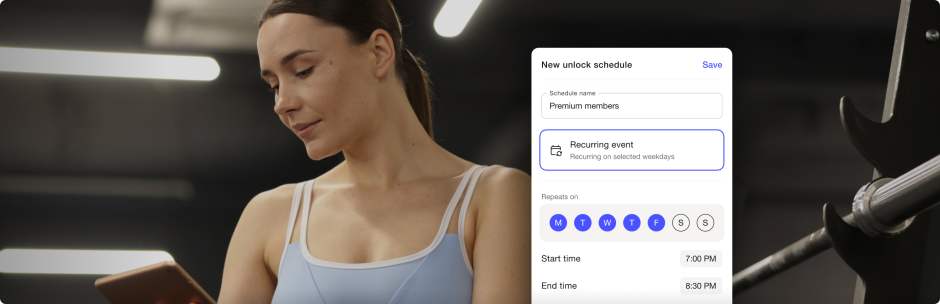
If we think about the scenario where someone will get locked out at 2 am, then having a backup plan for that will make your space operate even smoother. Operators can handle these events with remote unlocking from a dashboard, plus an intercom at the main entrance so a member can reach a human without a human being on site. As an added bonus, you can have scheduled access for contractors or cleaners to take care of the recurring cases a.k.a. the cleaning crew gets entry rights on Tuesdays from 6 to 8 am and at no other time.
7. Cover egress, liability, and insurance #
This is the step operators tend to skip, and it's the one that can shut the whole space down. Emergency exits must allow free egress at all times, whatever your locks are doing, and fire codes in most jurisdictions have specific requirements for electronically locked doors, such as fail-safe behavior during a power cut or alarm (which most access control hardware covers).
Also, always call your insurer before you extend hours, not after. Many policies price unstaffed hours differently or require specific measures, like camera coverage, panic buttons, or emergency lighting. Some regions also regulate lone use of fitness facilities, so a quick check with local authorities is worth an afternoon.
Extending hours in phases #
You don't have to go 24/7 on day one, and most gyms shouldn't. A phased rollout lets you test the setup while the stakes are low. A common path looks like this:
- Start by opening staff-free during the shoulder hours, say 5 to 8 am before your first shift arrives, or 8 to 11 pm after the last one leaves. Your systems handle a few dozen entries a day with no staff around, and you learn where the friction is.
- Then restrict overnight access to a premium tier, so your first true 24/7 users are your most invested members.
- Watch the entry data for a couple of months. If the logs are clean and the incidents are zero, expand to more hours or more members.
Atomic Athlete in Austin runs exactly this kind of split. "We're an unmanned gym with an open layout, so people can come and go as they please. The facility is set up with 24/7 access for some members, and the rest we restrict from 4 AM to 10 PM. Kisi allows us to enforce this membership differentiation."
Tiering can also turn your gym opening hours extension into a product. Round-the-clock access becomes something you sell, not just something you offer, and the members paying for it are the ones funding the hardware.

Handling visitors and non-members during unstaffed hours #
Members are the easy part, since they have standing credentials, but the trickier flows are everyone else. Day passes and trials are the common ways to work around this.
You can issue temporary mobile credentials that expire on their own (like QR codes), a guest pass that works for one visit or one day and then stops. The visitor gets in without staff involvement and you get a log entry with a name on it (which you can later sell to), instead of a stranger slipping in behind a member.
If members can bring a guest, give them a way to register one and generate a guest link. If they can't, tailgating detection can tell you anyway when or if someone tries to get access without approval.
For scheduled guests (deliveries, contractors, maintenance) a simple intercom with remote unlock covers the occasional daytime visits outside staffed windows.
The ROI of extending gym hours securely #
As a ballpark, the cost side is a controller and readers for one or two doors, cameras if you don't have them, and a software subscription. For a single-location gym that's typically a few thousand in hardware plus a monthly fee, and installation is often a one-day job if your doors already have electronic locks.
The return side has two engines. The first is payroll: one eliminated evening or weekend shift usually covers the entire system cost within the first year, and often within months. The second is revenue you couldn't earn before: off-peak memberships, a premium 24/7 tier, day passes sold at hours you used to be closed. Not to mention that tailgating prevention adds a quieter third stream by stopping entries you were never billing for.
Your numbers will naturally differ with your layout and your market, but the pattern holds, though: staffing savings carry the business case, and extended-hours revenue is what makes it grow.
Frequently asked questions #
How do you safely operate a gym without front desk staff? #
The short story would be replacing desk checks with credential-based entry synced to membership status, pairing every unlock with camera footage, and adding tailgating detection so unauthorized follow-ins get flagged. A remote dashboard plus an entrance intercom covers the situations where someone needs help, without anyone needing to be on site. It might seem like many elements, but the setup is much easier than expected.
Is it legal to run an unstaffed gym? #
In most places, yes, but the details are local. Fire codes govern how electronically locked doors must behave, insurers often set conditions for unstaffed hours, and some regions have rules about lone use of fitness facilities. Ideally, check with your insurer and local authorities before switching, since requirements vary too much for a general answer. (This isn't legal advice, and a quick call is cheaper than finding out afterward.)
What's the difference between 24/7 gym access and fully unmanned operations? #
24/7 access means members can enter at any hour and staff may or may not be present. Unmanned operations means the facility runs without staff on site, whether that's overnight or all day. Many gyms combine the two in stages: staffed during the day, unmanned but open at night.
How do gyms stop non-members from entering when no one is watching? #
The easiest ways to prevent non-members from entering are by using hard-to-share credentials like mobile access, having membership sync cut off lapsed accounts automatically, and setting up tailgating detection. Together these close the gaps a front desk used to cover by eyeball.
Extend gym hours securely with Kisi #
Extending your hours is one of the few upgrades that pays off in every direction at once. For gyms looking to grow, or just to keep pace with where the industry is heading, it's less a gamble than a natural next step. The technology to do it safely is mature, and the playbook above is well worn.
If you want credentials that can't be passed around, access that follows membership status on its own, and a clear record of who entered when nobody was there, you'll benefit from a system like Kisi. To learn more, feel free to get in touch with our team for a demo or a quote tailored to your facility.


Ana Coteneanu
Content writer @ Kisi | Ana focuses on long-form content that explores access control, space monetization, security, and modern workplace operations. With a background in technology-driven industries, she specializes in turning complex topics into practical insights for business audiences.
