

Registering visitors when they enter a building lobby or office's reception area is often a time-consuming, tedious process that can cause bottlenecks and unnecessary delays. Long lines of people waiting to write down their information and receive their visitor badges can quickly clog these busy areas, making your organization seem unprepared and less than welcoming.
An effective visitor registration system can handle data collection, scheduling, pre-approvals, and workflow automation before a guest reaches the front desk. This makes it ideal for high-security workplaces and coworking spaces, as well as any organization that wants to manage visitor identity, timing, and compliance in advance.
Visitors draw conclusions about businesses long before they step foot inside, and visitor registration establishes your competence and efficiency. This guide explores how this type of solution affects the pre-arrival experience, how the registration process works step by step, what to include in a visitor registration form, and why digitizing the registration funnel is worthwhile.
What is a visitor registration system? #
A visitor registration system is a visitor management tool organizations can use to collect data and schedule appointments with guests before they come to the property. It's often part of a larger sign-in system, but it's specifically designed to address the pre-arrival experience. You may also see it called a guest registration system or guest registration software, especially in coworking spaces, multi-tenant buildings and hospitality settings.

What is a visitor register? #
A visitor register is the record of everyone who visits a site: who they are, who they're seeing, and when they arrived and left. Traditionally, it's a paper book or sign-in sheet at reception, which is why the terms visitor register, visitor registry and visitor log are often used interchangeably.
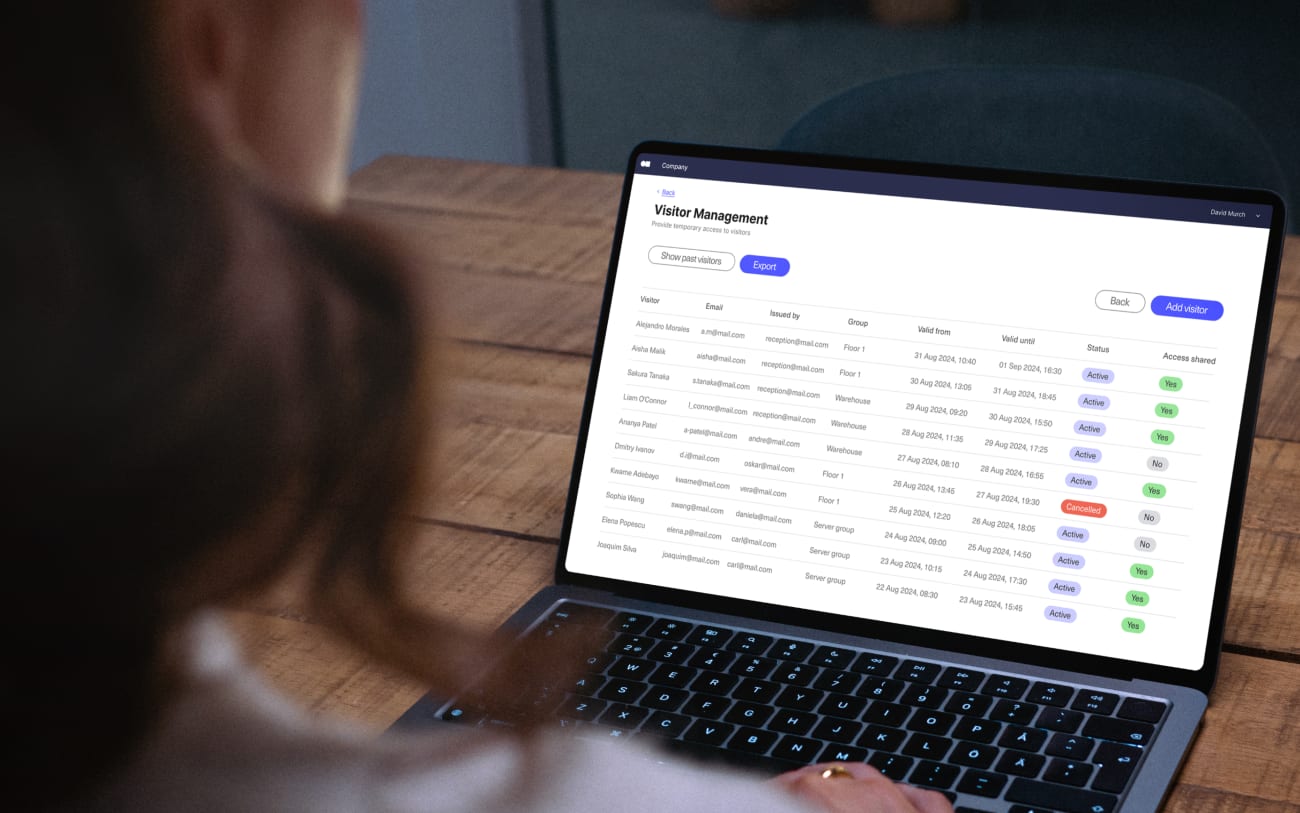
A visitor registration system builds that register automatically. Details are captured when the guest registers, and arrival and departure times are added when they check in and out, so you end up with a searchable digital record instead of a book.
The purpose of visitor registration in modern workplaces #
Managing visitor traffic doesn’t always start when a guest walks through the door. For many organizations, it begins much earlier. Rather than waiting to collect a visitor’s details when they come to your property, you can instead gather that information in advance. This approach gives you a better understanding of who is visiting and when, while also streamlining visitor arrivals.
Core functions of visitor registration solutions #
Visitor registration systems have different capabilities based on their design, but many digital solutions share a few central functions. More specifically, a system typically enables these tasks:
- Online pre-registration: With an online visitor registration system, guests can enter their personal details, including their names, contact information, and visit date, before their visit. Because the process is online, they can complete it at whatever time and place is most convenient for them.
- User verification: Organizations with security concerns can verify user identities during their initial registration. This might involve scanning their driver’s license and screening their names against a database of individuals who have been deemed unsafe or unwelcome on the property.
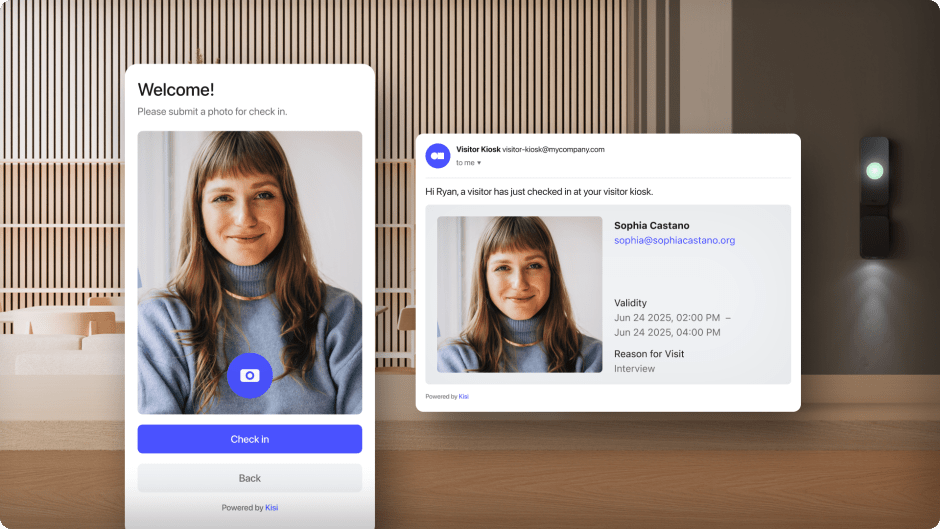
- Host notifications: When someone pre-registers, the system can automatically alert the organization about their upcoming visit. These notifications ensure hosts know when they need to be available to greet their guests and gives them the opportunity to prepare any documents or materials they might need during the visit or issue them visitor access.
- NDA signing: High-security organizations or those that handle sensitive information often require people to sign non-disclosure agreements (NDAs) before visiting. Visitor registration software can prompt future guests to sign and securely submit these documents when they register.
In addition to these essentials, many visitor registration systems offer expanded functions, such as custom sign-in fields for different guest types, branded invitation emails, directory sync, and management of visitors across multiple locations from one dashboard.

Visitor pre-registration #
Visitor pre-registration means collecting a guest's details, and approving their visit, before the day they arrive. It's the step that separates a visitor registration system from a basic sign-in tool, which only records people once they're already at the door.
Pre-registration usually starts in one of two ways:
- Host-initiated invites: An employee or tenant adds the guest's name, email or phone number, and visit time in the system. The guest then receives an invitation with any forms to complete.
- Self-registration: The guest fills in a registration form through a link or web page shared by the organization, and the visit is approved by the host or front desk.
Either way, the result is the same: by the time the guest arrives, the host has been notified, any NDAs are signed, and the visitor already has what they need to get in. With Kisi, for example, pre-registered guests can receive a time-limited access link or QR code by email or SMS and use it to unlock the doors they're allowed through, without downloading an app or creating an account.
Pre-registration works best for planned visits such as interviews, client meetings, contractor jobs and events. Walk-ins and unannounced visitors still need an on-site option, like a self-service kiosk or a video intercom, which is covered in the process below.
The visitor registration process #
Most digital visitor registration processes follow the same six steps, from the first invitation to the final record.
- Invite or register the guest. The host adds the visit in the system, or the guest registers through a shared link. Recurring visitors, such as contractors or cleaners, can be set up once with a schedule rather than invited every time.
- Collect details and documents. The guest completes the registration form, including any NDAs, safety briefings or ID checks your policy requires.
- Approve and notify. The visit is approved automatically or by the host, and the host receives a notification with the guest's arrival time.
- Issue access. The guest receives a visitor pass in the form of a QR code, access link, guest card or badge, limited to the right doors and the right time window.
- Check in on arrival. The guest scans their QR code, opens their link, or checks in at a visitor management kiosk. A badge can be printed at this point if needed. Walk-ins can register on the spot at the kiosk, while unannounced visitors can be verified and let in remotely through a video intercom.
- Check out and keep the record. When the visit ends, the check-out time is logged and temporary access expires. The full visit is stored in the visitor log, ready for reporting, audits or an emergency headcount.

What to include in a visitor registration form #
A good visitor registration form collects only what you need to identify the guest, prepare for the visit and meet your compliance obligations. Most organizations start with these fields:
Different guest types often need different forms. A job candidate and a contractor working in a restricted area shouldn't be asked the same questions, so look for a system that lets you customize fields by visitor type.
Collecting less is also part of good practice. Under privacy laws such as the GDPR, you should be able to explain why each field is needed and how long the data is kept, so avoid adding fields "just in case" and set a retention period for visitor records.
Comparing digital and traditional registration methods #
Pre-arrival visitor registration isn’t a new concept, but it has become more automated and advanced in recent years. While some businesses continue to use traditional sign-in sheets, many others are transitioning to fully digital solutions because of the distinct differences between the two.
In the past, registration generally involved an employee speaking to a visitor to collect their information. In many cases, they would speak on the phone, ask the visitor questions, and record their answers in visitor log or on a digital spreadsheet. In some cases, organizations might ask visitors to pre-register by submitting paperwork through the mail, or they might have email exchanges to collect personal details.
Unfortunately, all these approaches to visitor registration have serious flaws. Registration via phone, mail, and email is vulnerable to security breaches, making it easy for someone to gain unauthorized access to another person’s private information. In addition, it’s more likely for visitor information to contain errors if employees are taking details over the phone or trying to decipher a handwritten form.
As a result of these weaknesses, many organizations have moved away from traditional approaches in favor of visitor registration software. It doesn’t require direct interaction with staff prior to arrival, saving time for both the guest and your employees. The visitor also has full control over the information they enter, so it should contain fewer errors. Your team doesn’t have to worry about interpreting unclear handwriting or downloading unknown files attached to visitor emails.
Download our free visitor management app
Enhance visitor experience, maintain a secure environment, and ensure compliance with seamless visitor management.
Key features of visitor registration systems #
Today’s visitor registration systems are capable of much more than simply recording a future guest’s name and phone number. They have a wide range of features addressing virtually every aspect of the initial visitor experience.
Visitor analytics #
Understanding your visitor traffic allows you to make better decisions about many aspects of your operations. As a result, visitor registration systems often include analytics features you can use to examine trends in your visitor traffic. For example, you can see what times are most popular for visits, which employees are visited most often, and why different kinds of guests are visiting your property.
Automated access #
When a visitor registers prior to their visit, the visitor management system can auto-generate access credentials they can use when they arrive. They're often produced in the form of QR codes or access links sent by email or SMS, and they can be limited to specific doors and a set time window. Rather than having to check in with a staff member when they reach the front office or reception area, they simply have to use the temporary code or link they received. For these credentials to actually unlock doors, the registration system needs to be connected to your access control hardware.
On-site check-in and walk-ins #
Not every guest pre-registers. A good system also handles arrivals on the day, with a self-service kiosk where visitors can register, sign documents and print a badge, and a video intercom that lets staff see, talk to and let in unannounced visitors remotely. This way, pre-registered guests, walk-ins and deliveries all end up in the same visitor log.
Data encryption #
Data security is vital for organizations collecting visitor information through a registration system. As a result, high-quality software options use measures such as encryption to protect those details and prevent unauthorized parties from viewing them. Encrypting data also reassures visitors that their information is safe and that your organization takes their privacy seriously. Role-based permissions and set retention periods add a further layer of protection by limiting who can see visitor records and how long they're kept.
Integrations #
Another common feature of visitor registration software is the ability to connect it with other essential systems, including access control and video surveillance. Tying these solutions together gives you a more comprehensive view of on-premises activity and further enhances security for your property. For example, integrating visitor registration with access control allows you to simultaneously manage visitor and employee traffic and issue both temporary and long-term access credentials. Directory sync is also worth looking for, since it keeps the list of hosts up to date automatically.

Benefits #
Implementing a visitor registration system has a number of advantages from an operational and visitor perspective. It can enhance your decision-making, make the property safer, and eliminate manual tasks.
Security #
Visitor registration systems contribute to greater building security by allowing you to vet guests before they reach the site. Without this type of system, employees have to quickly confirm an individual’s identity, purpose, and background when they enter the front door.
Visitor registration software gives you ample time to screen their information and confirm they have a legitimate reason for coming to your facility. Because it automates these checks, a digital visitor management system also reduces errors. And because visitor access is tied to a time window, it expires on its own instead of relying on someone to collect a badge at the end of the day.
Efficiency #
A system with pre-registration capabilities saves employees substantial time and allows them to focus on other priorities. Instead of tasking staff with walking every individual through your organization’s check-in process, including getting their details, printing a badge, and calling or texting their host, all these tasks are completed ahead of time. Employees can be available to visitors who need last-minute support or have questions, but they won’t have to dedicate all their time and energy to overseeing guest arrivals.
Visitor registration is also faster from the visitor’s perspective. Allowing them to use a visitor registration app or website prior to their arrival means they can enter their information on their own time and don’t have to go through a lengthy on-site check-in process. When they arrive, all they have to do is quickly check in using a visitor management kiosk or scan a QR code that leads them to a visitor management app.
Compliance #
Many organizations use visitor management systems because they have to meet strict regulatory requirements related to access, security, and privacy. A system that collects vital visitor information and conducts checks before they arrive is particularly important in high-security facilities. In these types of environments, you may need to perform background checks, verify identities, and obtain signatures on paperwork before visitors can enter.
A visitor management system helps ensure only authorized individuals with the proper credentials enter the building. It also allows you to maintain a clear and detailed audit trail if regulators or stakeholders have questions about who has entered the property. Signed NDAs, check-in times and access link usage are stored together and can be exported as reports, which makes audits and internal reviews much quicker. The same records show who is on site at any moment, which is useful for evacuation headcounts.
Use cases for visitor registration systems #
Visitor registration software can benefit organizations across multiple industries and of various sizes. However, it’s especially crucial for these types of organizations:
- High-security offices: Visitor registration is an asset if security is a top priority for your organization. You’ll have advance notice of who will be on the property and can screen visitors for potential risks by checking their names against lists of banned individuals.
- Hybrid workplaces: With fewer people in the office on any given day, there's often no one at reception to greet guests. Pre-registration means the host is notified, the visitor already has access, and nobody is left waiting at a locked door.
- Multi-tenant buildings: If your organization operates in a building with multiple businesses, a visitor registration system can create a smoother arrival experience for your employees and guests. For example, you’ll know if you need to meet a visitor in the building’s lobby or grant them access to a primary door.
- Coworking spaces: Members bring in clients, interviewees and day guests all the time. Guest registration lets members invite their own visitors, while the operator keeps a record of everyone on site.
- Manufacturing and industrial sites: Contractors and suppliers often need safety briefings, signed policies and access to specific areas only. Registration captures all of this before they arrive.
Visitor pre-registration is most helpful in these types of scenarios, but it’s also an excellent solution for any business hoping to increase security and streamline the check-in process.
Kisi's visitor registration system is well-suited to these and other organizations in search of a reliable, user-friendly solution. In addition, integrating visitor registration with access control allows you to automate the entire visitor management workflow. Kisi's free plan includes unlimited visitor entries, host notifications and visitor logs with no hardware required, and you can try features like access links, QR codes, badge printing and NDA collection with a 30-day free trial. If you're ready to digitize visitor registration, reach out to explore Kisi's free plan or sign up for a free trial of a paid plan.

Deliver a better first impression at every entry point
Give visitors a smoother experience while maintaining visibility and control.
Frequently asked questions #
What is visitor registration? #
Visitor registration is the process of collecting a guest's details, such as their name, contact information, host and visit time, so an organization knows who is coming on site. It can happen before the visit through pre-registration, or on arrival at a front desk or kiosk.
What is the difference between visitor registration and visitor check-in? #
Registration happens before or at the start of the visit and captures who the guest is and why they're coming. Check-in is the moment they arrive and are let in. In a digital system, a pre-registered guest's check-in can be as quick as scanning a QR code.
How does visitor pre-registration work? #
A host invites the guest, or the guest registers through a shared link. The guest completes any forms or NDAs, the host is notified, and the guest receives an access link, QR code or badge to use when they arrive.
Do visitors need to download an app? #
Not necessarily. With Kisi, visitors receive access links or QR codes by email or SMS and can unlock doors without downloading an app or creating an account.
Is visitor registration software GDPR compliant? #
It depends on the provider and how you use it. Look for encryption, a data processing agreement, and controls over which fields you collect and how long records are kept, then make sure your own registration form only asks for what you need.
Do I need a kiosk or other hardware? #
No. You can pre-register visitors, send notifications and keep visitor logs with software alone. A kiosk adds a dedicated check-in point for walk-ins and badge printing, and access control hardware lets visitor credentials unlock doors.